
Unofficial companion for Aion 2 · Free

Your #1
Aion 2 companion

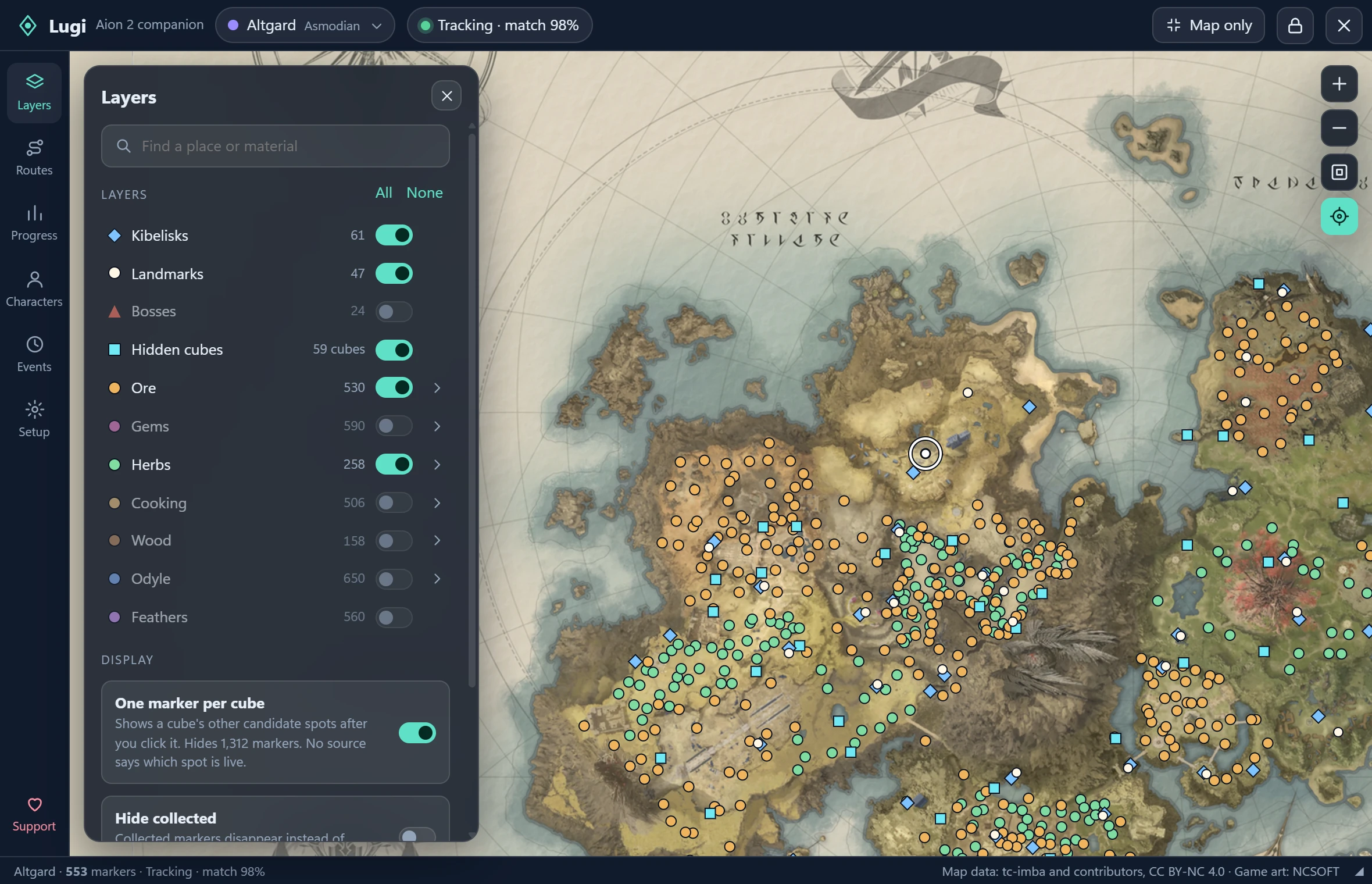
Lugi is a map overlay that shows where you are, where the ore and hidden cubes are, and where your quest goes next. It reads your minimap off the screen, so nothing is ever injected into the game.

Version 1.0.0 · Windows 10 and 11 · Nothing to install

The Lugi window tracking a player on the Altgard map, with ore, herb, hidden cube and Kibelisk markers and the Layers panel open beside it
Reads screen pixels only No code injection No game memory access No automated input No account, no payment

What it does

One small window over your game, with everything you would otherwise alt-tab for.

It knows where you are

Lugi matches the terrain on your minimap against the region map and puts you on it, about once a second. The arrow shows the direction you are moving, and Follow me keeps you centred. You set it up once by dragging a box around your minimap.

  • Pauses by itself when the game is not in front
  • Hides your position instead of guessing when a match fails

Ore, herbs and every gathering node

Switch each gathering category on or off, open it to pick single materials, or press Only to see just the one you are farming. A Find box narrows the map as you type.

Hidden cubes, tamed

Each cube can appear at one of several spots. Lugi shows one marker per cube until you click it, then all of its candidate spots. Mark it collected and every spot settles.

Character lookup

Search Global characters by region and server, or paste a profile link. Inspect equipment, skills and stats, and save favourites. No game login or API key.

Event timers

Regional countdowns, daily and weekly resets, favourites and optional reminders, with an optional strip on the map. Times are community-observed schedules, not live spawn detection.

Progress for each character

Profiles keep their own collected markers and route progress. Back everything up to a folder, and point that at your file-sync tool to carry it between PCs.

Stays out of your way

Map only hides everything but the map and shrinks down to 140×110. Click-through lets your clicks pass straight to the game, and opacity is yours to set.

CtrlShiftF9 Hide or show CtrlShiftF10 Click-through CtrlShiftF11 Step reached

Routes

Your quest list picks the route. You just walk.

Lugi reads the quest tracker on your screen, works out which story quest you are on, and opens the route that covers it. When your quests move on, so does the route.

  • The next step shows with its distance and compass direction
  • Plain waypoints can complete themselves when you arrive
  • Switch green side quests in or out without breaking the main order
  • Eleven community routes included, for both factions up to level 45

Make your own. Click the map to add waypoints, drag to move them, label quest pickups and turn-ins, then export the route as a single file to share.

Getting started

Playing with a map in about two minutes.

  1. 1

    Download and run

    Unzip the download and double-click Lugi.exe. Nothing to install. The first start fetches the maps, which takes about a minute and happens once.

  2. 2

    Show it your minimap

    Pick your region, then drag a box around the minimap and right-click your player arrow. That is the whole setup.

  3. 3

    Play

    Run Aion 2 borderless or windowed and keep the minimap visible. Lugi tracks whenever the game is in front.

Coming soon

Lugi is growing from a map into a full companion.

In development

DPS meter

A combat meter with its own small HUD: your DPS, total damage, fight time and a history of past encounters. It will be optional and separate from the map, so everything else works with it switched off.

Planned

Route sharing

Publish your quest and gathering routes and browse the ones other players have made, without leaving Lugi. Today routes are shared as single files you import and export.

Questions

Good things to know first.

Does Lugi touch the game?

The map, routes and quest reading work from screen pixels only. Lugi takes a picture of your minimap and quest list and reads them, the way you would. It does not read game memory, inject code, or control your character.

The DPS meter in development is a separate, optional feature that works differently: it passively listens to your own PC's game traffic, without changing it. You choose whether to use it.

Lugi is an unofficial fan tool. Working this way does not mean NCSOFT has approved it, and nobody can promise how future game or anti-cheat changes will treat any third-party tool.

Is it really free?

Yes. There is no payment, account or online service. If you would like to support development, there is a Ko-fi page.

Windows says it "protected my PC". Why?

Lugi is not code-signed yet, so Windows shows that notice for it. Choose More info, then Run anyway. Downloaded updates are checked against the checksum published with each release before they are installed.

Which regions does it cover?

Altgard for Asmodians and Verteron for Elyos, on the Global client. You pick your region from the title bar; it is not detected automatically.

Do the markers show what is up right now?

No. Markers are known locations, not live availability. Lugi cannot see whether a node has been gathered or which spot a hidden cube is using at the moment.

The overlay does not appear over my game.

Run Aion 2 in borderless or windowed mode. Overlays may not show over exclusive fullscreen. Quest reading needs the English client and is tuned for a 16:9 window at the default UI scale; you can outline the quest list yourself for anything else.

How do I remove it?

Delete the program, and delete the %LOCALAPPDATA%\Waymark folder where your settings, routes and maps are kept. Nothing else is left behind.

Get Lugi

Free for Windows 10 and 11. One file, and nothing to install.

Unzip it, put Lugi.exe anywhere and double-click. It keeps itself up to date.

Needs the Microsoft Edge WebView2 runtime, which Windows 11 already includes. About 80 MB.